SaaSGama
Compliance Management reviewing business software

Compliance Management

Simplify Software Licence Compliance and Audit Tracking

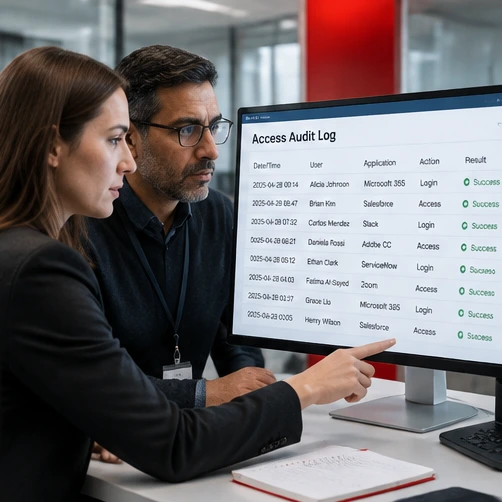
Automated audit trails, license compliance monitoring and access history help you pass vendor audits and security reviews without the scramble. SaaS compliance management with a clear software license audit trail for every tool.

  • 14-day free trial
  • No credit card
  • Cancel anytime

In short

What is Compliance Management in SaaSGama? Automated audit trails, license compliance monitoring and access history help you pass vendor audits and security reviews without the scramble.

Why it matters

Audit-ready, every day.

Software licensing has two sides: what your contract permits and who actually has access. Keep seat counts, access history and change records visible so your team can investigate discrepancies and answer audit questions without reconstructing months of decisions from email.

Try Compliance Management free for 14 daysNo credit card · Set up in 5 minutes
License insightsIllustrative data

One excess assignment needs an owner

A fictional license review flags a tool that exceeds its recorded entitlement.

3
Tools reviewed
1
Discrepancy
5
Seats to reconcile
SubscriptionContracted / assignedReview status
Design workspace40 / 45Review 5 seats
Meeting tool60 / 54Within seat count
Project workspace25 / 22Within seat count

Being within a seat count is not a certification of compliance. Vendor terms, access controls and your wider security processes still apply.

In everyday business

Clear use cases. Practical outcomes.

01

Prepare for a vendor license review

A vendor asks whether your assigned licenses match your agreement.

How you manage it

Compare contracted seat counts with assignments and review any mismatch with the subscription owner before responding.

A more organized response with the right records and fewer last-minute surprises.

02

Investigate an access change

An internal reviewer needs to understand who changed an assignment and when.

How you manage it

Use the audit trail and access history to trace the change, then confirm the business reason with the responsible owner.

A documented explanation rather than a chain of recollections.

03

Review access after team changes

People move roles or leave, but access ownership is spread across several teams.

How you manage it

Coordinate a license and access review, reclaim unneeded seats and retain the relevant change history.

Reduce orphaned access and give future reviewers a record of the decision.

See compliance management on your own stack.

Connect your tools in 5 minutes. 14-day free trial, no credit card.

Try Compliance Management free

The licensing workflow

From visibility to a decision.

  1. 1

    Record the entitlement

    Store contracted seat limits and relevant licensing terms alongside each subscription. Confirm any vendor-specific licensing restrictions.

  2. 2

    Compare access and terms

    Review assignments against your entitlement and role-based access expectations. Escalate a mismatch to the tool owner before making a change.

  3. 3

    Retain the decision trail

    Keep who, what and when attached to changes and review access history as part of your internal audit process.

The problem

Vendor audits and security questionnaires turn into week-long fire drills of digging through emails and spreadsheets.

Enterprise-grade security

Audit trails

Every change logged with who, what and when.

License compliance

Stay within contracted seat counts automatically.

Access history

Prove who had access to what, at any time.

Proof you can check

Measure the outcome, not the promise.

Entitlement reconciliation

Compare contracted and assigned seats for each reviewed tool rather than relying on a single company-wide total.

Traceable changes

Use change history to establish the person, action and time associated with an assignment change.

Review accountability

Give each identified discrepancy an owner and a next action, then confirm the resolution.

Customer outcomes

What visibility changed for real businesses.

Anonymous customer examples reported by SaaSGama. Individual outcomes, not averages or guaranteed results.

$12M-turnover business

Over $28K

Annual savings after assigning ownership

This customer assigned software ownership to the respective teams and saved more than $28,000 annually. Clear ownership connected each tool to the team responsible for its business need.

Customer identity withheld

Put this to work this week.

Questions SMBs ask us.

Does SaaSGama certify our software compliance?

No. SaaSGama provides licence monitoring, audit trails and access history to support your compliance reviews. It does not replace legal advice, vendor terms or independent certification.

How can I check whether my business is using more software licences than contracted?

Compare the number of contracted seats with assigned licences for each application. SaaSGama helps highlight discrepancies so you can review them with the responsible subscription owner.

What information should I prepare for a software licence audit?

Keep your contract entitlements, current licence assignments, access history and change records available. SaaSGama helps organise these records for your internal or vendor review.

Can I track who changed a software licence and when?

Yes. SaaSGama's audit trails record who made a change, what was changed and when, helping your team investigate assignment updates and access history.

How can I review software access when an employee leaves?

Review the employee's assigned software licences, reclaim access that is no longer needed and retain the relevant change history. This helps reduce orphaned access and supports future reviews.

How long does it take to set up SaaSGama Compliance Management?

You can get started in about five minutes by connecting Google Workspace, Microsoft 365 or a supported accounting tool, or by uploading a CSV file.

What you get

Outcomes you can count on.

01

Pass vendor audits

02

Faster security reviews

03

Lower compliance risk

Ready to see it live?

Try Compliance Management free

More features

See what you can cut — free for 14 days.

Connect Google Workspace, Microsoft 365 or your accounting tool in about 5 minutes. Get a clear list of unused licenses and upcoming renewals. No credit card, cancel anytime.

  • 14-day free trial
  • No credit card
  • Cancel anytime
Try Compliance Management free

14 days free · No credit card